
Food cost software for restaurants: know your real cost.
LagatBook turns every supplier bill into a price you can trust. Add the bill, check each line, approve it, and LagatBook records what you paid per kg, per litre or per piece, then shows what changed when the next bill comes in. It is the food cost add-on by POSBADA.
- Photo, PDF or typed
- Per kg, litre or piece
- Every price links to its bill
Updated
See LagatBook in 82 seconds.
One bill, start to finish: add it, check it, approve it, and what the next bill shows you. Best with the sound on.
Read the video transcript
Quick question. What did you pay for a kilo of rice, last month?
Not sure? You're not alone. Bills pile up: on paper, in WhatsApp photos, as PDFs... and the prices just disappear.
Meet LagatBook, by POSBADA. It turns every supplier bill into a price you can trust.
Got a bill? Snap a photo, upload the PDF, or simply type it in.
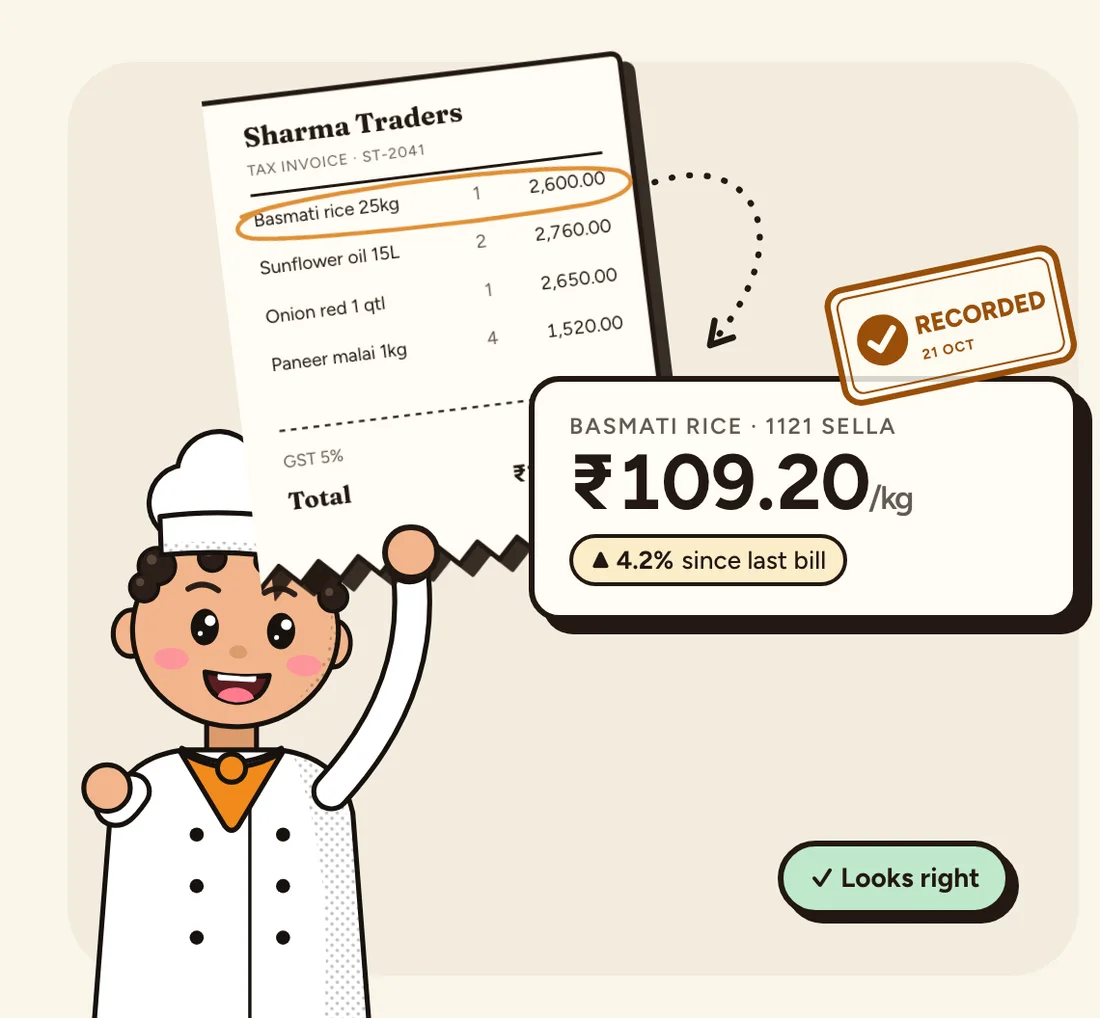
Then check each line against the bill. Looks right? Tap it, and move on. Nothing becomes a price until you approve.
When the total matches, approve. Every price is recorded per kilo, per litre, or per piece.
And the next bill from that supplier? It shows exactly what changed. Oil went up? You'll see it, with the bill that proves it.
Your whole price book, in one place. Old prices are flagged, every price links to its bill, and you can download it all for your accountant.
So the next time a supplier says, prices went up... you'll already know.
LagatBook, by POSBADA. Know your real cost. Ask your POSBADA contact to switch it on.
What is food cost software?
Food cost software keeps track of what a restaurant pays for its ingredients, so the owner can see costs rise before they eat into the margin. LagatBook does this from the supplier bills you already get: each approved bill becomes a dated price per kg, litre or piece for every ingredient on it, with the bill kept as proof.
A 25 kg bag of basmati rice for ₹2,600 plus 5% GST becomes ₹109.20 per kg. A 15 litre tin of oil becomes a price per litre. Prices in different pack sizes become comparable, so you can see that oil went up 6.5% even when the tin size changed.
Why the prices on your bills matter
Food cost is the biggest bill most restaurants pay, and it moves every week. Oil goes up by a few rupees a litre, paneer by ten rupees a kilo, and nobody notices until the month's numbers look wrong. The proof was on the supplier bills all along, but those bills are on paper, in WhatsApp photos and in PDFs, and nobody has time to compare them.
LagatBook keeps that proof in one place. Each approved bill adds the exact price you paid to your price book, and the next bill from the same supplier shows what changed. To turn those prices into a monthly number, see the food cost percentage formula.
How LagatBook tracks food cost: three steps for every bill
- Add the billTake a photo, upload the PDF your supplier sent, or type it in line by line. Typing always works.
- Check each lineEvery line starts unchecked. Compare it with the bill and tap “Looks right”. Nothing becomes a price until you approve.
- Approve, and knowWhen the total matches, approve. Each price is saved per kg, per litre or per piece, and the next bill from that supplier shows exactly what changed.
Track supplier prices in one price book
- The latest price you paid for each ingredient, per kg, litre or piece
- What changed since the last bill, up or down, with the percentage
- Old prices flagged, so you know which ones to check again
- Every price opens the bill it came from
- Download it all as a CSV file for your accountant
- Separate prices for each location, never averaged together
LagatBook also stops two easy mistakes: it warns you when a bill looks like one you already approved, and when a price is far from what you usually pay.
LagatBook vs a notebook or spreadsheet
| Task | LagatBook | Notebook or spreadsheet |
|---|---|---|
| Entering a bill | Photo, PDF or typed, then check each line | Copy every line by hand |
| Different pack sizes | Price per kg, litre or piece for every line | Work out ₹ per kg yourself |
| Price changes | Shown as soon as the next bill is approved | Found when someone compares old bills |
| Proof | Every price opens its own bill | The bill is somewhere in a file or a phone |
| Mistakes | Warns about repeat bills and unusual prices | A typo stays until someone notices |
| For your accountant | Download a CSV file | Send photos of pages |
LagatBook and POSBADA billing
LagatBook is a separate add-on with its own login and its own data. If you bill with POSBADA restaurant billing, the owner opens it from Settings and signs in with POSBADA. Your sales and menu stay in POSBADA; LagatBook only holds the supplier bills and prices you add.
LagatBook is made by POSBADA, the restaurant POS and billing software from Ankaavi Technologies in Gurugram.
Coming next: recipe costs and dish margins, so you can see what each plate costs you to make and which dishes need a new price. Until then, the food cost percentage formula shows how to price a dish from these ingredient prices, and our restaurant closing checklist includes the monthly stock note.
LagatBook questions.
Something else? Ask on WhatsApp.
What is LagatBook?
LagatBook is a food cost add-on by POSBADA. It turns your supplier bills into a price book: what you paid for each ingredient per kg, litre or piece, and what changed since the last bill.
How do I get LagatBook?
LagatBook is invite-only for now. Message us on WhatsApp or ask your POSBADA contact, and we will switch it on for your restaurant.
Does it read the bill for me?
When bill reading is on for your account, LagatBook fills in the lines from a photo or PDF and you check each one before it counts. You can always type a bill in yourself.
Why do I have to check every line?
Because a wrong price is worse than no price. Every line starts unchecked, and nothing becomes a price until you approve the bill. If you find a mistake later, you can correct it and the history is kept.
Do I need POSBADA to use LagatBook?
LagatBook has its own login, so it does not need your billing data. POSBADA owners can open it from Settings and sign in with POSBADA.
Can my manager or cook add bills?
Yes. The owner can invite people with a link, and each person gets their own login.
Who is LagatBook for?
Restaurants, cafes, cloud kitchens and caterers in India that buy from suppliers every week and want to know what they really pay for rice, oil, paneer, vegetables and everything else.
Does it handle GST on the bill?
Yes. You enter the bill as printed, with its tax and total, and LagatBook checks that the lines add up to the bill total before you approve it. Most restaurants pay GST they cannot claim back, so it stays in the price. If your business does claim input tax credit, the owner can switch that on and keep it out.
Does it work out the cost of each dish?
Not yet. Recipe costs and dish margins are coming next. Today LagatBook gives you the ingredient prices those will be built on.
Know your real cost.
LagatBook is invite-only for now. Message us on WhatsApp and we will set it up with you.
Ask for LagatBookor call +91 92112 79170